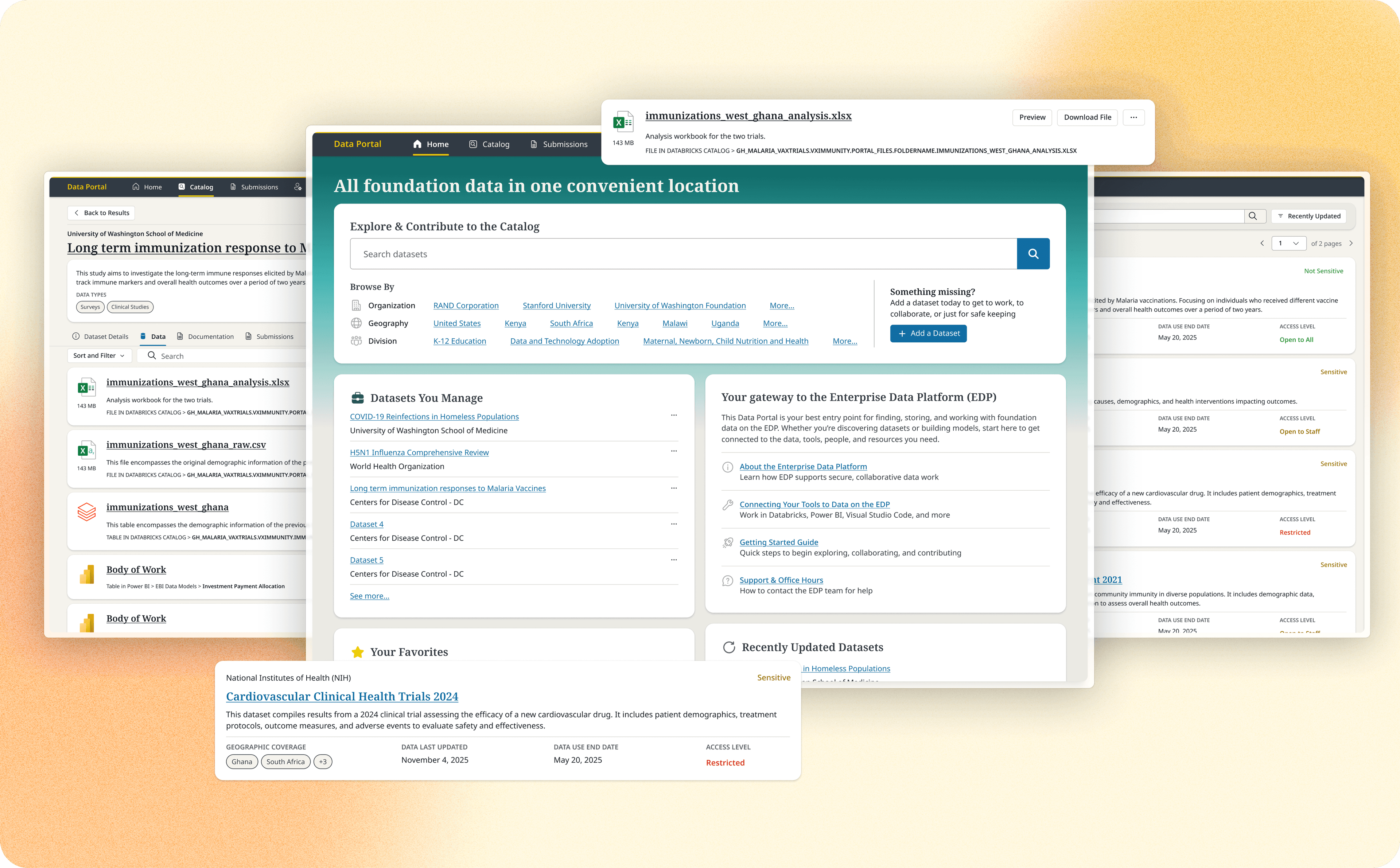
Gates Foundation Data Portal
Role
Primary Product Designer
Duration
13 months · 2024–25
Team
Product, Engineering, Research
tl;dr
I was the primary product designer on the Gates Foundation's Enterprise Data Platform (EDP) Data Portal, a 0-to-1 replacement for the Foundation's legacy data exchange. I owned end-to-end design across ingestion, cataloging, and discovery, and in the project's final quarter stepped into a pseudo-design-lead role, owning requirements, acceptance criteria, and design sign-off independently.
Outcome
As of March 2026, the Data Portal supports 41 active datasets stewarded by 13 teams across 21 data providers, and is on track to fully replace the legacy Gates Data Exchange (GDX). It's received positive feedback for improving data discoverability and governance across the Foundation, with new datasets being migrated and created daily.
Overview
The EDP Data Portal gives third-party grantees a secure way to upload research data, while letting Foundation staff search, filter, and evaluate datasets in support of research and strategic decision-making. As demand for data, analytics, and AI use cases grew across the organization, the legacy GDX system couldn't keep up, so the Foundation needed a platform that balanced discoverability and transparency with strong governance and legal safeguards. Handling sensitive research data meant any misstep carried real legal and reputational risk.
I joined under the Foundation's HCD Principal as the primary designer responsible for the end-to-end experience, translating complex governance and legal requirements into a scalable, usable product serving both internal staff and external contributors.
Building Trust with AI Search
Search was a core pillar of the Data Portal, and also where I did some of my most independent decision-making.
As we began to look at traditional index searches vs Azure AI search, our search subject matter expert gave us a brief around the challenges they were facing with AI search.
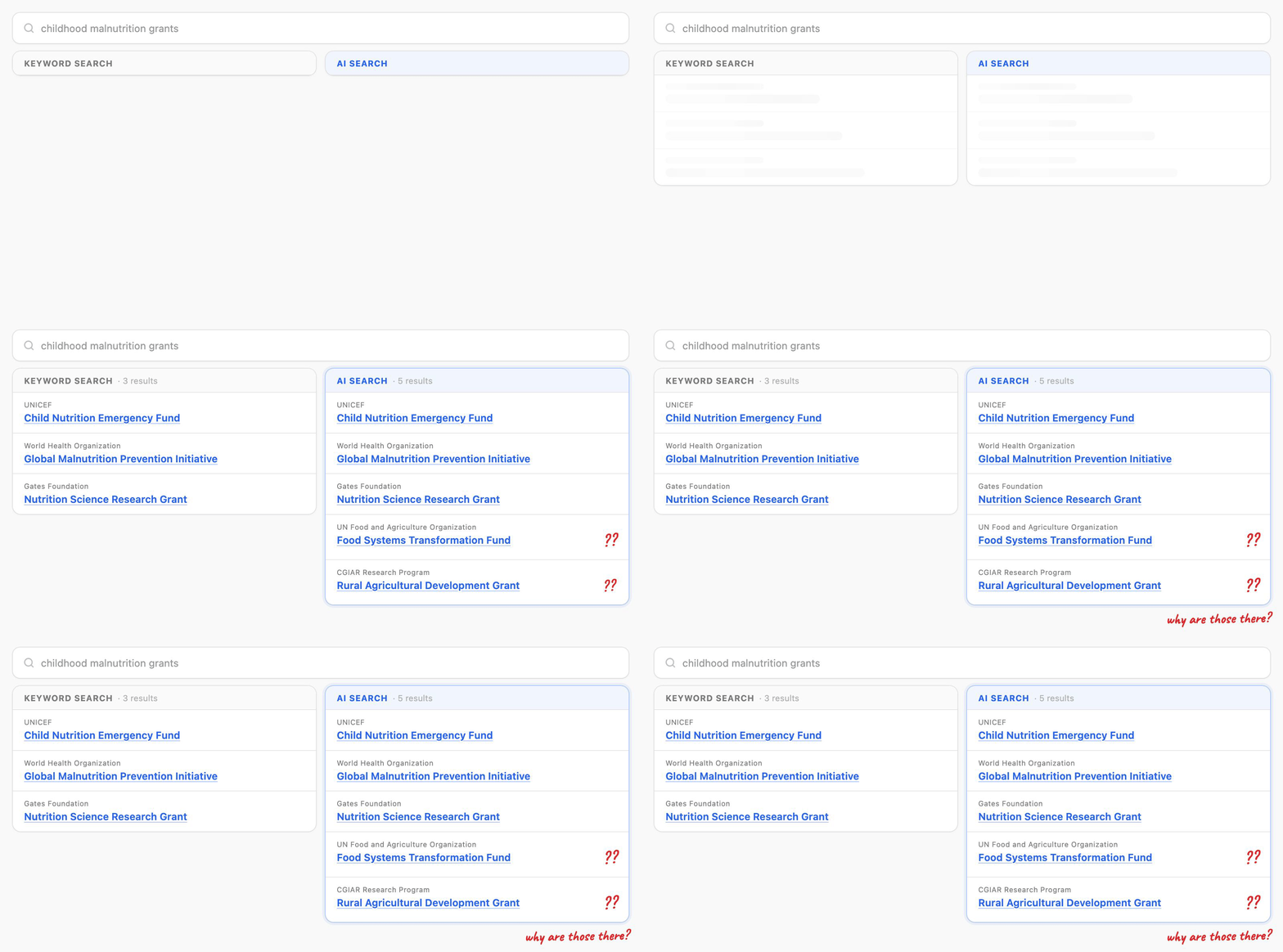
Sometimes AI search would surface more results than a traditional index search would, and some of those results had no visible reason for matching. A dataset would show up with nothing in its metadata explaining why. The match had actually come from a data file inside the dataset, not the dataset itself, but the user couldn't see that. While I'd like to hope that subtle curiosity would have folks go "Why is that there?" like a serendipitously placed book in a library containing the answer they were looking for. Realistically? It was going to look like the system was returning things at random. That kind of doubt is poison for a search experience, and even worse for adoption.
I explored a few directions. Return matching datasets and files together. A tabbed view separating the two. Or a dataset-results-first approach where each card flagged whether the match came from the dataset, a file, or both.
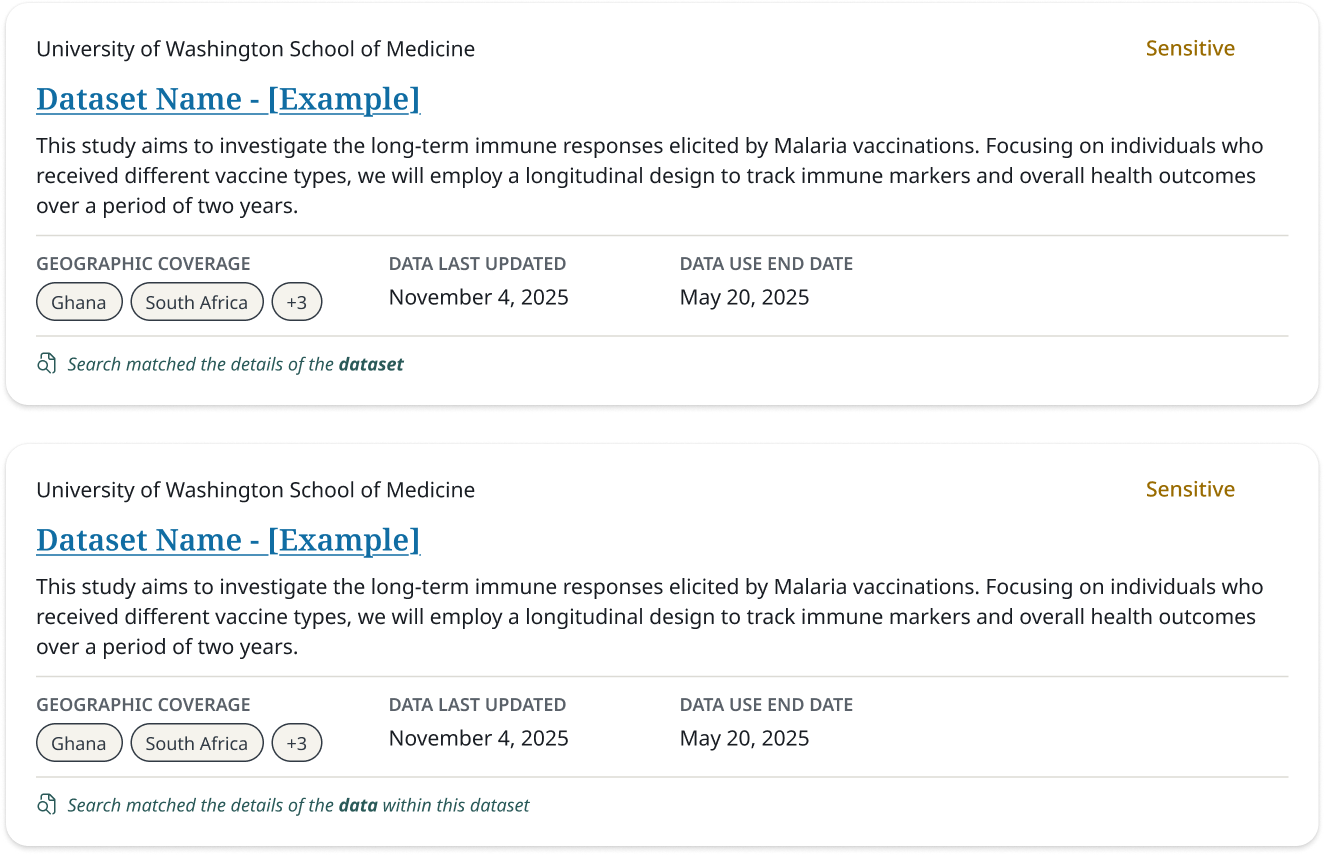
Engineering pushed hard for the tabbed view. The problem was that testing on a similar platform had shown tabs performing poorly. People missed them, and tabs nudge users toward comparing options (which is what tabs are good for) rather than hunting down one specific dataset or file and exploring it. Another important consideration was that this whole time we were designging the browse and search experience through the lens of datasets, with data files being a child element. The files were contextually tied to the dataset it came from and surfacing data files by itself erroded the importance that the datasets had. After working through it with our search SME, my design lead, and designers on adjacent teams, I made the call to go with the dataset-first approach plus a match-source indicator on each card. It addressed the trust problem head-on, and it left us room to push further later by surfacing the specific fields and files behind each match.
Stepping into my Lead's Shoes
In my final quarter on the project, my design lead rolled off. Another designer slotted in to run our first pass on user testing, and I took over the work with the Product Owner: figuring out what to prioritize and what requirements those features carried. I kicked it off by facilitating a Q4 planning meeting with the PO, solution architects, and dev team to identify which features needed design support, how they'd fall across the remaining sprints, and what our review cadence would be going forward.
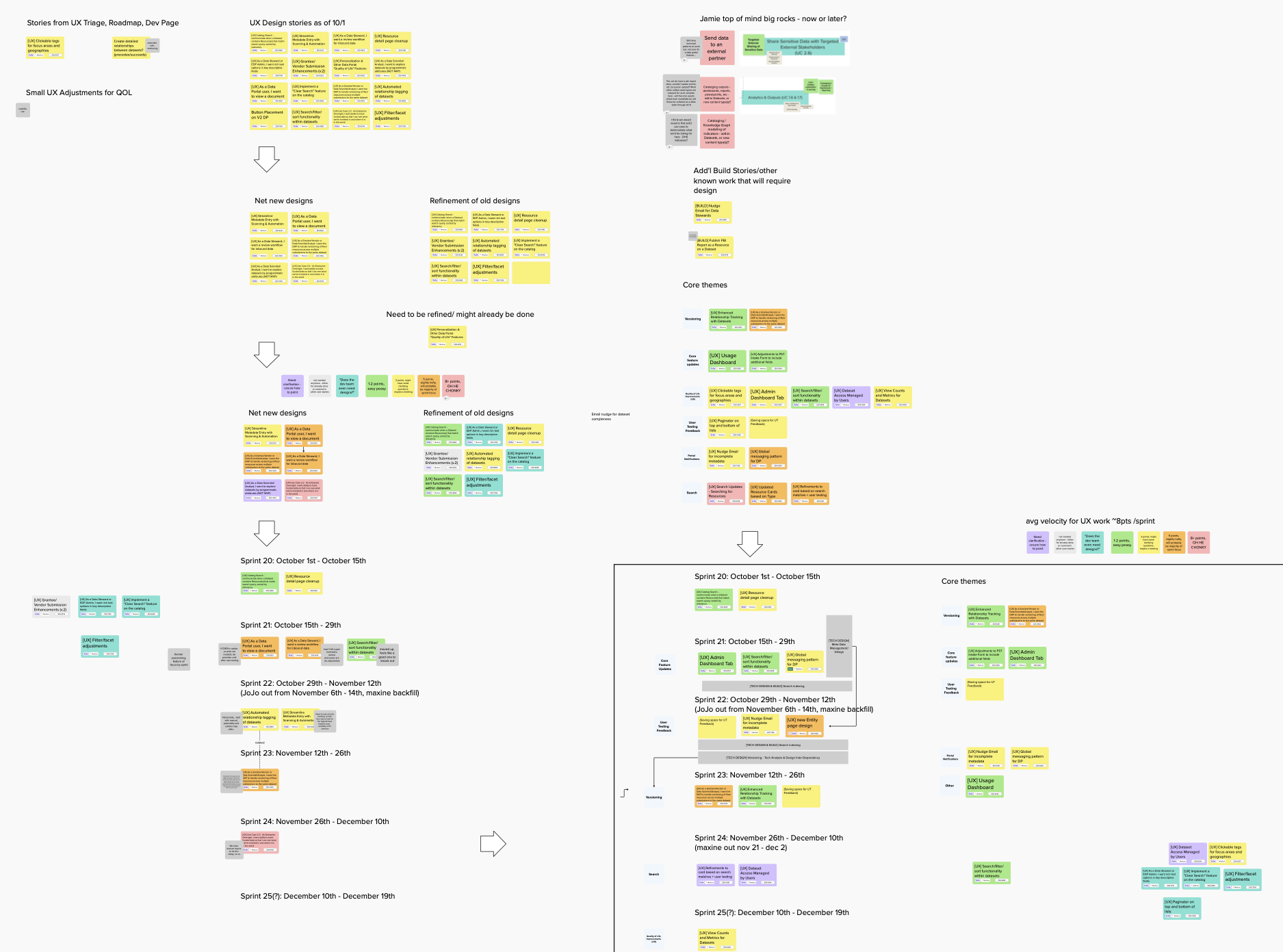
From there, I owned feature requirements, acceptance criteria, and, for the first time, being the person who decided from a design perspective when something was actually done. I'd check in with my former lead now and then and bounce ideas off the other designer handling user testing, but the calls were mine. It was nerve-racking at first. It's also the stretch where I realized how much I'd grown in being able to hold the full scope of a product experience on my own.
Self-Service on the Data Portal
Enabling self-service dataset creation was a key long-term goal, and one of the hardest problems on the project. To create a dataset, users had to understand legal classifications, governance terms, and brand-new information-classification concepts. Many of those were still being defined in collaboration with legal while we were designing around them.

We originally went with a wizard flow to walk users through these concepts without overwhelming them. But between the time constraints for development and how unfamiliar the terminology was, we pivoted to an intake-based approach for the pilot. Users submitted whatever they knew through a simplified form, and an EDP administrator reviewed and filled in the remaining metadata, with email reminders to finalize. It reduced friction for first-time creators, kept governance standards intact, and let the platform start gaining adoption. It also left room to scale toward fuller self-service later, without punishing users who only had partial context to begin with.
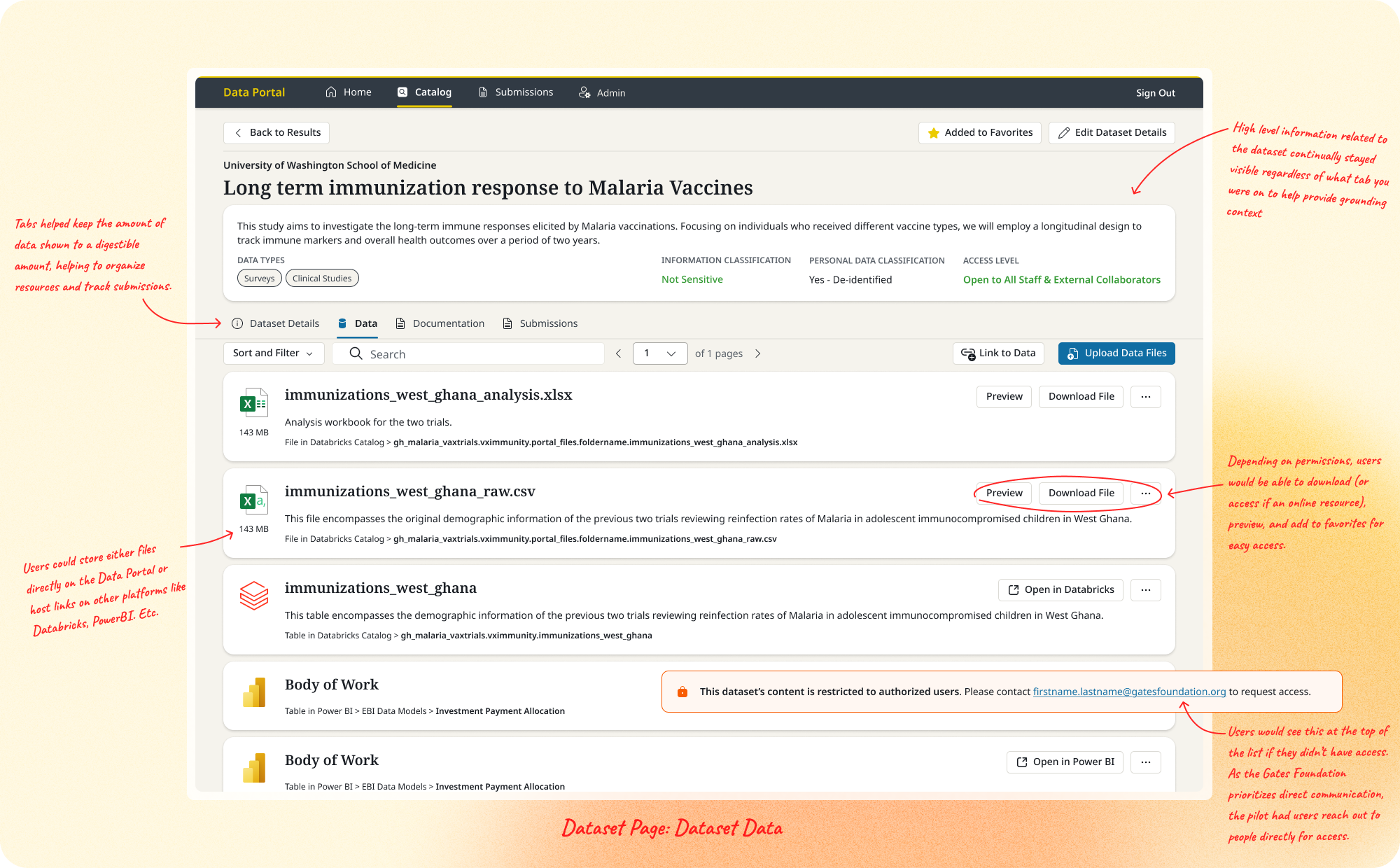
Direct upload eventually became the primary action on the Data and Documentation tabs, so users no longer needed the one-time submission flow to get data onto the platform if they weren't a third party vendor.
Building the Core Surfaces
The Data Portal was true 0-to-1 work, and I was handling design across all of the surfaces.
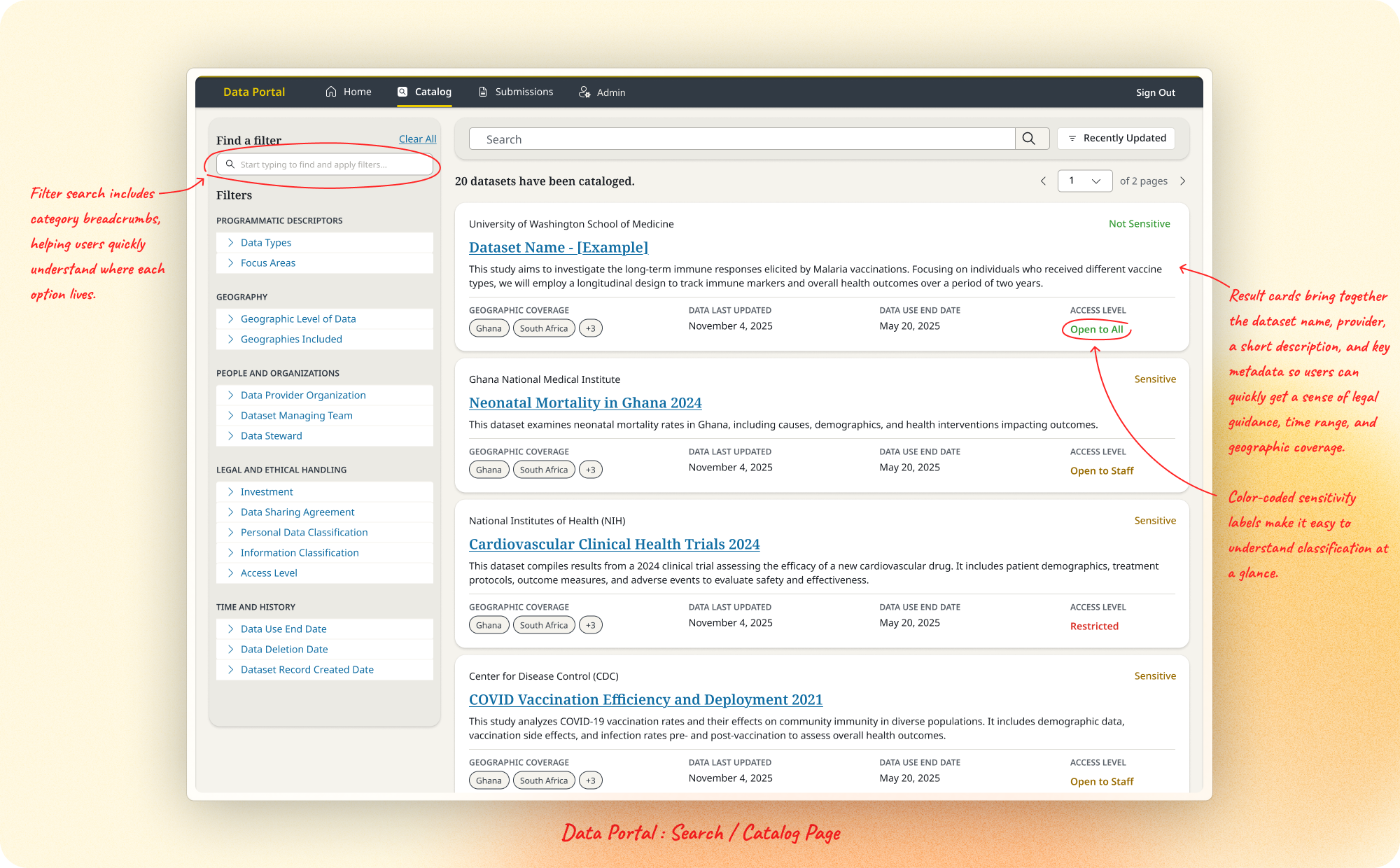
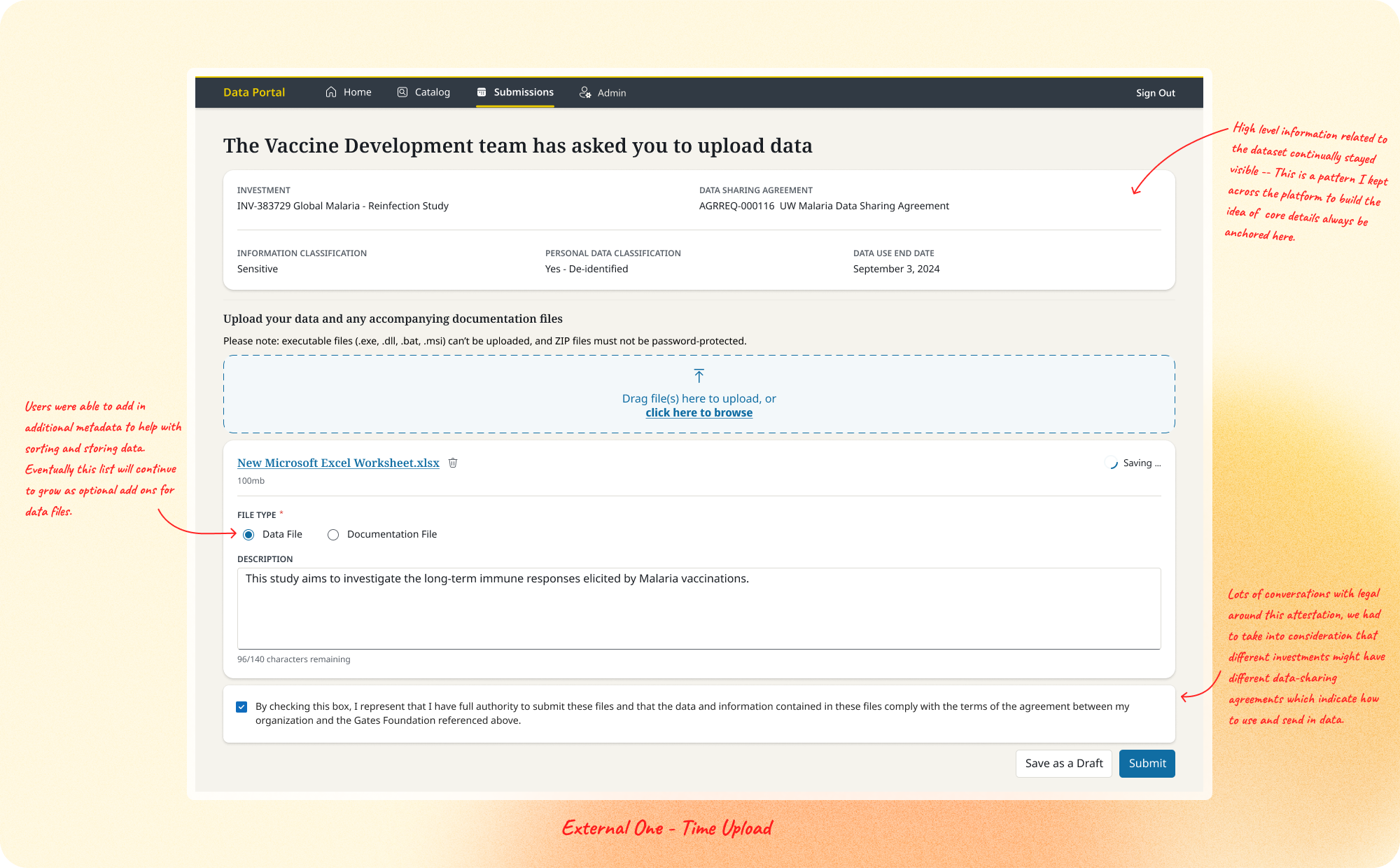
One-Time External Upload. The first feature we shipped: an MVP secure upload flow letting external grantees submit data and documentation with required metadata, with minimal friction for first-time users. Clear submission confirmation and a home screen for tracking previous and outstanding submissions became the model for every upload feature that followed.
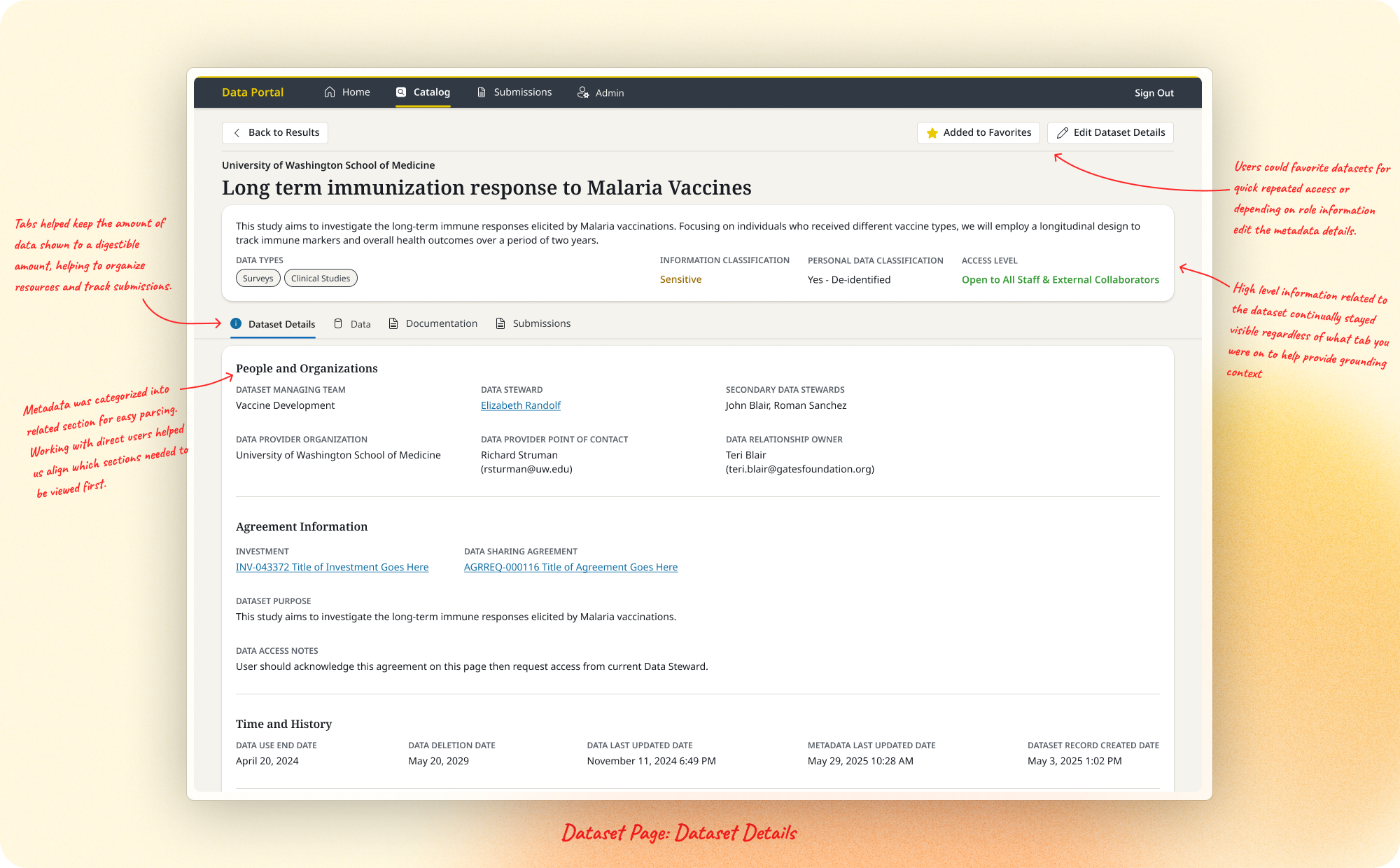
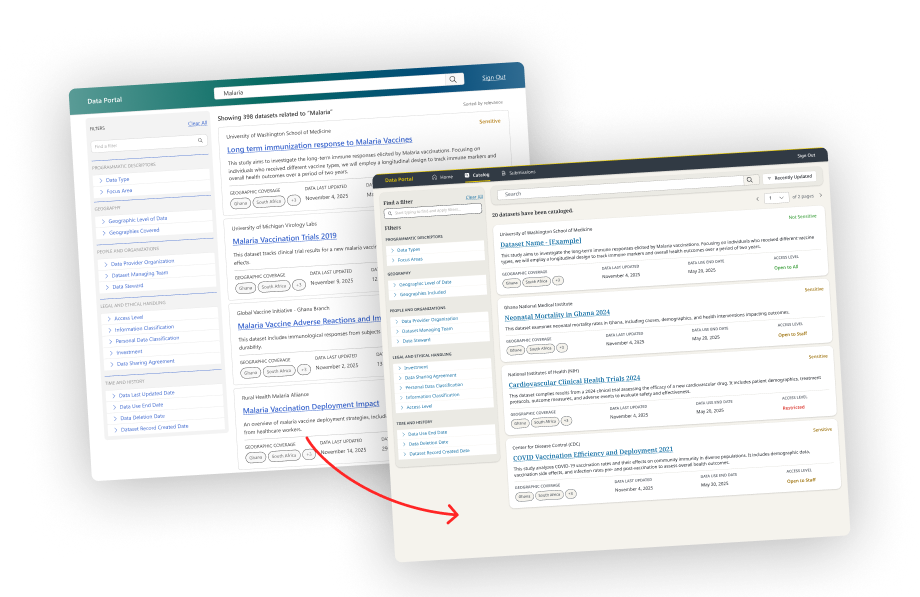
Dataset Pages. Datasets were the core unit of the portal, spanning research data, Databricks collections, Power BI reports, and more. Drawing on the legacy GDX system, I identified the metadata that had to stay consistently visible for evaluation, and organized content into tabs (Data Files, Documentation, Dataset Details) to prevent cognitive overload. I later added a Submissions view so Data Stewards could track who'd been asked to submit, each submission's status, and what had arrived, all in-platform. This area begun to expand in feature once we started thinking about self-service in adding and requesting files.
Design System. We explored reusing components from a sister app, Aurora, but technical and visual constraints led us to build a dedicated Data Portal system. Using atomic design principles, I adapted Microsoft Fluent components and documented usage patterns for consistency. When the Foundation rebranded mid-project, I worked with the communications team to apply new standards to the portal's external-facing elements, which also gave the platform a distinct identity separate from Aurora.
User Testing
We tested with 5 Data Stewards, 4 Catalog Users (analysts, data scientists, program coordinators), and 1 Legal representative.
Working well:
- The portal's potential to centralize Foundation data into a single destination
- A clean UI and straightforward task flows that were easy to navigate
- Filters, search, and metadata for locating datasets and assessing relevance
Needed improvement:
- Users struggled to understand what access they had to specific datasets and files
- Concepts like Databricks were unfamiliar, and access paths were unclear
- Terminology like "Information Classification" vs. "Access Level" caused confusion
- Access-restriction banners had low visibility and were often missed
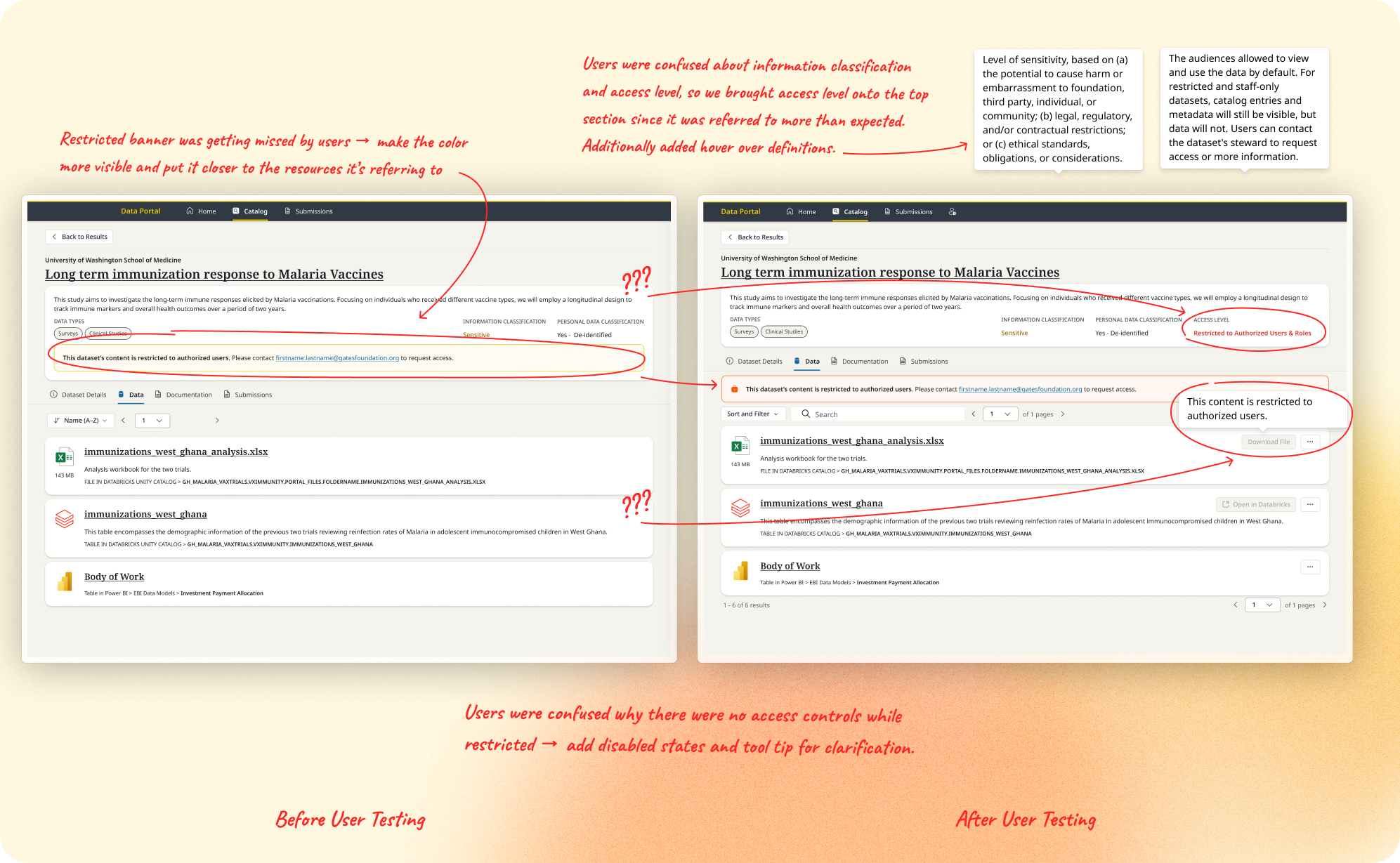
This directly shaped production priorities: features blocked on unresolved access issues (like "Go to Databricks") were deprioritized with a disabled variant in the interim, we added contextual tooltips on new terms, and we moved alerts closer to the content they referenced rather than sitting as a global banner at the top of the page.
Reflection
This is some of my most meaningful work, and where I've grown the most as a designer. Working 0-to-1, from early concepts through MVP and into a full production environment, gave me a real appreciation for end-to-end product design: scoping with a Product Owner, planning rollouts, balancing user needs against legal, technical, and organizational constraints. I was lucky to learn under Design Principal Jamie Thomson Pate, whose mentorship shaped how I think about the way design connects to strategy and operations.
One thing I'd do differently: push for user validation earlier. We were only able to validate and work with users in the last quarter of my engagement, so the feedback around cognitive load and metadata prioritization surfaced later than I would have liked, having that feedback sooner would have helped us refine the details that matter most to Data Stewards and Data Scientists. The self-service metadata problem is one I'm still thinking about, balancing completeness without recreating GDX's old issues of optional fields left blank. I'd love to see how the team solves that over time.
It was a pleasure to get to work with this team. I wish them all the best, and if you're reading this, thanks for letting me be a part of the journey. Keep on rockin!